Hi. i’m trying to install the openmv firmware on my board, but the ide doesn’t recognize the bootloader update and the “softdevice” on my board…any ideas?. I took some prints. Thanks in advanced. Regards.


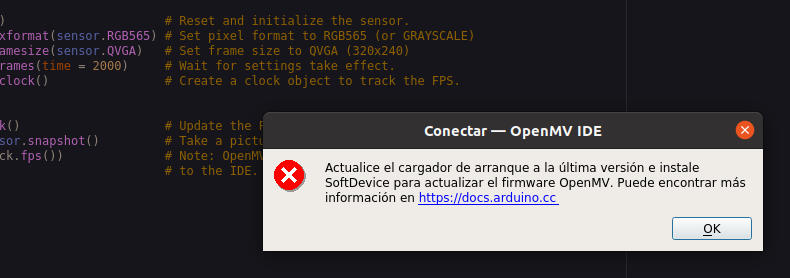
You have to set the soft device to OpenMV mode. It will ask you that in the Arduino bootloader flasher.

Mmm, this was working when I last tested it. Please make a bug report on GitHub and I’ll schedule to look into why it’s broken.
Ok. Thank you very much.
I am having the same issue. I have two different Arduino Nano 33 BLE Senses. First one works and second (newer) gives the same errors as mentioned before. Same issue with two different computers and USB cables.
If I double click reset twice in the non-working one, I managed to upload the firmware. However, it still isn’t able to connect or do anything with that one.
Thank you Samuli. I already tried that, but it didn’t work for me.
Yeah it doesn’t work for me either. The one that works, everything works for that. The other one works fine with Arduino and Edge Impulse but for some reason I can’t get it to work with OpenMV. And this is strange because both of them are the same Arduino Nano 33 BLE Sense. The one that works was bought in summer and the one that doesn’t was bought last week.
I bought mine 3 month ago. I wrote a bug report on github:
issue
I also having the same issue.
I have one Arduino Nano 33 BLE sense.
OpenMV IDE 2.9.2.
When try to download Firmware v4.3.1. OpenMV IDE dies.
I have also an Arduino Nano RP2040 connect.
It has no problem flashing OpenMV Firmware.
It uses picotool, and full command is
/Applications/OpenMV IDE.app/Contents/Resources/picotool/osx/picotool load -x /User/doojin/.config/OpenMV/qtcreator/firmware/ARDUINO_NANO_RP2040_CONNECT/firmware.bin
I can run it on the terminal.
I didn’t succeed on the BLE Sense, and don’t know which tool used in flashing.
Please share the info.
I think the soft device flashing address different from https://docs.arduino.cc/tutorials/nano-33-ble/getting-started-omv.
On the web page the address is 26000
Actually the message shows the address A0000
I found solution in Example “Nano33_updateBLandSoftDevice”.
This example updates bootloader and also flashes Softdevice.
There is a hint for full command.
% /Applications/OpenMV\ IDE.app/Contents/Resources/bossac/osx/bossac -d --port=/dev/tty.usbmodem14101 --offset=0x16000 -U -i -e -w ~/.config/OpenMV/qtcreator/firmware/NANO33/firmware.bin
It worked for me.
hi there, I’m having a slightly different issue with this. I am also following the Arduino guidance. I manage to get the DFU firmware updated, with a message displayed saying BOSSAC firmware updated. But then when i click Ok openMV simply says there is no CAM connected, and then that there are no BOSSAC settings for my device, despite having just said the firmware was updated. Any help is appreciated here,
Thanks.

Which DFU firmware are you referring to ? This board doesn’t use DFU.
Can you make sure you’re using the latest IDE ? Should be 2.9.2
Hi, our firmware doesn’t support an older version of the RPI board. There’s some issue where after we commit the firmware to it that it doesn’t stick. @iabdalkader knows more about this. It’s not an IDE issue but related to something with the flash I believe.

Yeah, it’s not going to work generally because of the library code used for our firmware or because of the board. I forget which. @iabdalkader


Just download MicroPython Installer and install the required micro python library.
It was that easy for me