Note that the example script just finds the active marker blobs. It does not perform frequency analysis. We are enabling event mode soon which will allow you to do this and Prophesee will provide an example of this.
Thank you for pointing me to the example script—I’ll give it a try! I’m very excited to hear that you’ll be enabling event mode soon, which will make real‐time frequency analysis possible. Would you be able to share an approximate timeline for when event mode support might be released?
Great to hear that you are interested in high-speed LED Frequency detection.
Indeed, you will need to wait a little bit for Event mode activation. Then, you will need to implement some frequency analysis based on events timestamps (as there is no such sample yet).
As mentioned by Kwabena, you will need to tune sensor biases. Bias tuning depends on your LEDs. you can tune each individual biases or start from a ready preset
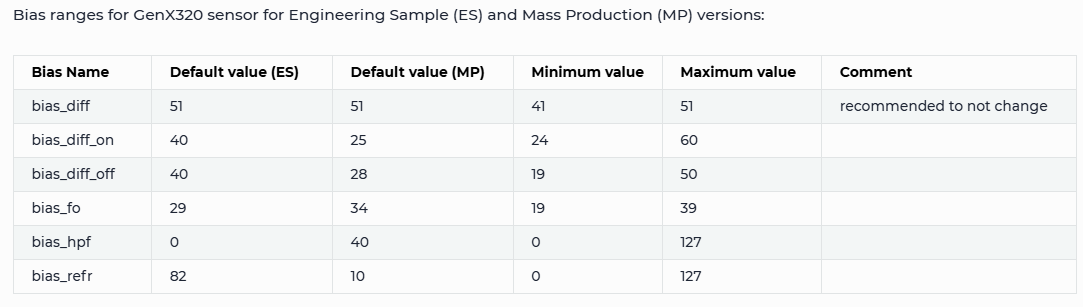
Not clear if you want to remove the flicker or see only the flicker(high frequency) ? You can actually tune the sensor to see only the range of frequencies using bias_hpf (defines from which frequency you can see) and bias_fo (defines up to which frequency you can see). Some more details on biases tuning are available here Biases — Metavision SDK Docs 5.1.1 documentation
There is also AFK (AntiFlicker filtering) where you can specify a range of frequencies to filter but it is less performant comparing to bias settings (less advantageous for the sensor readout).
# Enables AFK filter to remove periodic data in the frequency range from 130Hz to 160Hz
sensor.ioctl(sensor.IOCTL_GENX320_SET_AFK, 1, 130, 160)
The PR is finished and waiting on a review from Prophesee. They gave some feedback about an issue with the Anti Flicker not working as expected.
Kinda want them to approve things before merging. The feature is otherwise optional with examples. I can post the firmware to run it and link to the examples.
I’m using the OpenMV H7 Plus, and I’d really appreciate it if you could share the current firmware and examples. Even if it’s still pending final approval, I’d be happy to try it out and provide feedback if needed.
Yeah, the OpenMV GENX320 event camera module is definitely worth buying! I feel like it’s already priced more affordably compared to similar offerings from other vendors.
Plus, if you run into any issues, posting on the forum usually gets you a quick and helpful response.
Hi, I have configured the GENX320 event camera to work in Event mode, and by adding the following two lines of code I was able to make the camera detect only flickering LEDs:
You can actually tune the sensor to see only the range of frequencies using bias_hpf (defines from which frequency you can see) and bias_fo (defines up to which frequency you can see).
I would like to adjust individual bias parameters—bias_diff_on, bias_diff_off, bias_fo, bias_hpf, or bias_refr—to better match my LED’s flicker characteristics.
In OpenMV, how do I tweak one bias register at a time? Is there an ioctl call that lets me set just a single bias?
Hi,
The previous “firmware.bin” doesn’t seem to be able to run GENX320 latest script directly, where should I download the latest “firmware.bin” to be able to run GENX320 recent python script directly.