RPC library stalls when using any interface option

Howdy,

I am using an Arduino Uno/Teensy4.1 as the controller to an OpenMV H7 Plus camera microcontroller. I am using the Arduino to test the communication protocol and execution of the script on the OpenMV camera. I have both devices plugged in via USB. I have seen in some of the forums that connection over USB might cause an issue, but I have tested the code and communication via SPI previously and it worked perfectly fine. Integration into the Teensy is for use in an integrated system with a dedicated power source.

The examples from the rpc library were working via SPI and I had no problems. I took a break from the project for a month or so, and when I tried to run the same script the OpenMV camera would stall. I am fairly certain that the wiring between both devices is done properly.

When I terminate the program I get the following traceback message:
Traceback (most recent call last):
File “”, line 26, in
File “rpc.py”, line 358, in loop
File “rpc.py”, line 293, in __get_command
File “rpc.py”, line 90, in _get_packet
File “rpc.py”, line 609, in get_bytes
Exception: IDE interrupt

I have created a smaller script to test the communication between the two boards. The goal of the script is to blink the led (blue) whenever a call to the function is made. Here are those scripts:
Arduino / Teensy Code

#include <openmvrpc.h>
openmv::rpc_scratch_buffer<256> scratch_buffer; // All RPC objects share this buffer.
openmv::rpc_spi_master interface(10, 100000, SPI_MODE2);

void setup() {
    interface.begin();
    Serial.begin(115200);
}

void exe_blinky()
{
    struct { uint16_t val; } res;
    Serial.print("Attempting to call blinky \n");
    Serial.println(interface.call(F("blinky"), &res, sizeof(res)));
    if (interface.call(F("blinky"), &res, sizeof(res))) {
        Serial.print(F("Result ["));
        Serial.print(res.val);
        Serial.println(F("]"));
    }
}

void loop() {
    exe_blinky();
}

OpenMV Code

import time
import image
import math
import rpc
import sensor
import struct
from machine import LED

sensor.reset()
sensor.set_pixformat(sensor.RGB565)
sensor.set_framesize(sensor.QVGA)
sensor.skip_frames(time=2000)

led = LED("LED_BLUE")

interface = rpc.rpc_spi_slave(cs_pin="P3", clk_polarity=1, clk_phase=0)

def blinky(data):
    img = sensor.snapshot()
    led.on()
    time.sleep_ms(500)
    led.off()
    time.sleep_ms(500)
    return struct.pack("<H", 1)

interface.register_callback(blinky)
interface.loop()
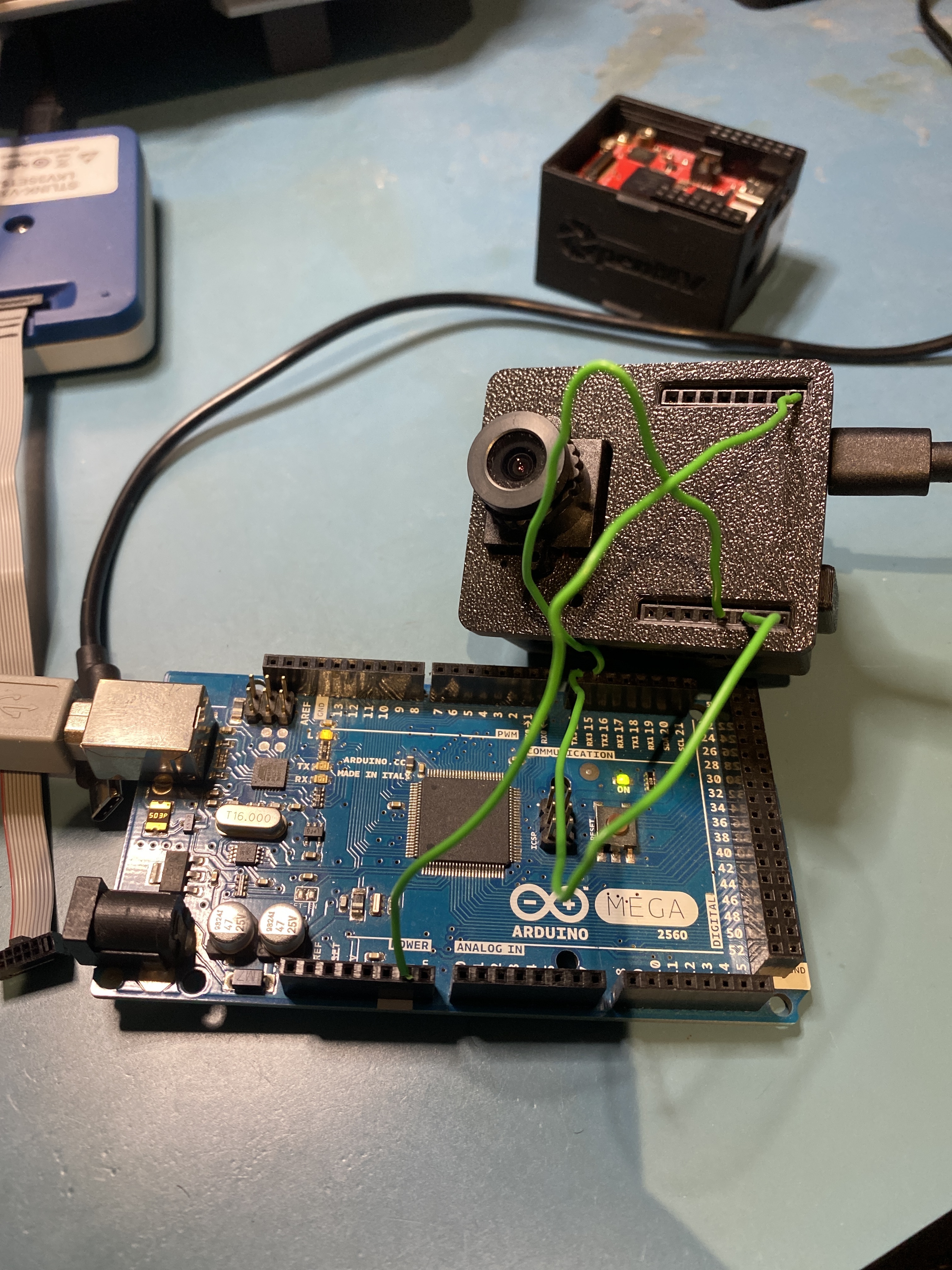
Hi, the issue is likely the long 1000 ms sleep you are doing before responding. The library would timeout waiting on the H7.

The other side is waiting on the return of the function call with the response data. If you want to blink and LED async you should use the MicroPython schedule method with a machine timer module.

Thank you for the quick response! I see what you are saying. However, I don’t think that the 1000 ms sleep is the root of the issue. Take for example the following snippet of code taken from the examples
Arduino / Teensy Code

#include <openmvrpc.h>

openmv::rpc_scratch_buffer<256> scratch_buffer; // All RPC objects share this buffer.

openmv::rpc_spi_master interface(10, 1000000, SPI_MODE2);

void setup() {
    interface.begin();
    Serial.begin(115200);
}

void exe_color_detection()
{
    int8_t color_thresholds[6] = {30, 100, 15, 127, 15, 127}; // generic_red_thresholds
    // int8_t color_thresholds[6] = {30, 100, -64, -8, -32, 32}; // generic_green_thresholds
    // int8_t color_thresholds[6] = {0, 30, 0, 64, -128, 0}; // generic_blue_thresholds
    struct { uint16_t cx, cy; } color_detection_result;
    if (interface.call(F("color_detection"), &color_detection_result, sizeof(color_detection_result))) {
        Serial.print(F("Result "));
        Serial.print(color_detection_result.cx);
        Serial.print(F(", cy="));
        Serial.print(color_detection_result.cy);
        Serial.println(F("]"));
    }
}

void loop() {
    exe_color_detection();
}

OpenMV Code

import image
import math
import rpc
import sensor
import struct

sensor.reset()
sensor.set_pixformat(sensor.RGB565)
sensor.set_framesize(sensor.QVGA)
sensor.skip_frames(time=2000)

interface = rpc.rpc_spi_slave(cs_pin="P3", clk_polarity=1, clk_phase=0)

# When called returns the x/y centroid of the largest blob
# within the OpenMV Cam's field-of-view.
#
# data is the 6-byte color tracking threshold tuple of L_MIN, L_MAX, A_MIN, A_MAX, B_MIN, B_MAX.
def color_detection(data):
    sensor.set_pixformat(sensor.RGB565)
    sensor.set_framesize(sensor.QVGA)
    thresholds = struct.unpack("<bbbbbb", data)
    blobs = sensor.snapshot().find_blobs(
        [thresholds], pixels_threshold=500, area_threshold=500, merge=True, margin=20
    )
    if not blobs:
        return bytes()  # No detections.
    for b in blobs:
        sensor.get_fb().draw_rectangle(b.rect(), color=(255, 0, 0))
        sensor.get_fb().draw_cross(b.cx(), b.cy(), color=(0, 255, 0))
    out_blob = max(blobs, key=lambda b: b.density())
    return struct.pack("<HH", out_blob.cx(), out_blob.cy())

interface.register_callback(color_detection)

interface.loop()

I still encounter the same issue that I mentioned above. That is, the interface library stalls on the OpenMV cam and does not execute the function that is being called. I want to emphasize that from my testing, the issue persists regardless of the function being called.

Would you suggest that there is too long of a pause between the call and return for this function?

Can you try via the UART interface versus the SPI interface just to isolate the issue?

I don’t know if the Teensy’s SPI interface works with the OpenMV Cam. You said this was working before. Not sure if something changed to break it. The UART interface should be much more robust as it’s an async interface by default.

I confirmed the SPI interface works with the Arduino Library and the OpenMV Cam H7 with an Arduino Uno after our last MicroPython update and changes. It should be fine now.

Thank you again for your response. I have attempted and succeeded at implementing the UART interface! However, here are some issues that I am facing:

  1. The communication of data between the boards is not working. I am getting “ovf”, very large, or nonsensical values for variables in the struct. I am verifying this by printing out the variables received after the interface calls the function.
  2. The camera will randomly drop to 0 frames for an extended period of time (roughly 15 seconds) (i.e communication cuts out) - I have tried various baud rates to remedy the issue with varying results.

Here is a small snippet of how the struct is being packed and unpacked, respectively.
OpenMV (packing variables)

clock = time.clock()
start = time.ticks_ms()
def find_coordinates(data):
    clock.tick()
    current_msmt = time.ticks_ms()
    pxl_pos = np.zeros((6,2))
    timer = float(time.ticks_diff(current_msmt,start)/1000)
    return struct.pack(
            "<hfffffffffffff",
            -1,
            float(pxl_pos[0][0]),
            float(pxl_pos[0][1]),
            float(pxl_pos[1][0]),
            float(pxl_pos[1][1]),
            float(pxl_pos[2][0]),
            float(pxl_pos[2][1]),
            float(pxl_pos[3][0]),
            float(pxl_pos[3][1]),
            float(pxl_pos[4][0]),
            float(pxl_pos[4][1]),
            float(pxl_pos[5][0]),
            float(pxl_pos[5][1]),
            float(timer),
        )

Teensy (unpacking variables)

void exe_find_coordinates()
{
  struct{short id; float u1,v1,u2,v2,u3,v3,u4,v4,u5,v5,u6,v6,t;} result;
  if(interface.call_no_args(F("find_2d_3d_correspondence"), &result, sizeof(result))){
    // Print results 
    // Number of Points
    Serial.print(F("Id="));
    Serial.print(result.id);
    // IDX 1 
    Serial.print(F(", u1="));
    Serial.print(result.u1,5);
    Serial.print(F(", v1="));
    Serial.print(result.v1,5);
    // Same code for IDX 2 - 6
    .
    .
    .
    // Time
    Serial.print(F(", t="));
    Serial.println(result.t,5);
  }
}

Some example outputs from the serial terminal on the Teensy:

Id=-1, u1=0.00000, v1=0.00000, u2=0.00000, v2=0.00000, u3=0.00000, v3=0.00000, u4=0.00000, v4=0.00000, u5=0.00000, v5=0.00000, u6=0.00000, v6=436207616.00000, t=2.23837
Id=-1, u1=0.00000, v1=0.00000, u2=0.00000, v2=0.00000, u3=0.00000, v3=0.00000, u4=0.00000, v4=0.00000, u5=0.00000, v5=0.00000, u6=0.00000, v6=ovf, t=2.23837

I am currently operating at a baud rate of 115200. Any guidance on how to tackle these issues is greatly appreciated!

Hi, can you please verify that the default example script of popular features for the OpenMV Cam running on the OpenMV Cam and then the master script on the teensy work as expected?

You should have 3 wires connecting the two boards, RX/TX and ground. RX from the OpenMV Cam plugs into TX of the Teensy and TX from the OpenMV Cam plugs into RX of the Teensy.

I’m a bit confused by your post because it doesn’t sound like you’ve succeeded at implementing the interface.

I assume you are also using a different UART that the one attached to the PC? I think the Teensy has a USB uart so this should generally be the case for a hardware UART.

I just verified the library is working correctly with the H7 Plus and an Arduino Mega using the UART Interface over Serial3.

Thank you, I was able to verify that the interface (UART) is working correctly and receiving / sending the correct number of bytes. One thing I’d like to point out (for anyone else that comes across this) is that the short datatype for the Teensy was taking up 4 bytes of memory whereas for OpenMV it takes 2 bytes of memory. This lead to undiscernible data through an invalid memory access. Thank you again for your help!

Woah! That’s very broken behavior. Short should always be 16 bits on any 32bit MCU.