# Problem Regarding Color Recognition
**URL:** https://forums.openmv.io/t/problem-regarding-color-recognition/6334
**Category:** OpenMV Boards
**Created:** [September 13, 2021, 1:45am UTC](https://forums.openmv.io/t/problem-regarding-color-recognition/6334 "2021-09-13T01:45:33Z")
**Posts on this page:** 14
**Page:** 1
### Author:  [@JGreineder](https://forums.openmv.io/u/JGreineder)
#### Post date: [September 13, 2021, 1:45am UTC](https://forums.openmv.io/t/problem-regarding-color-recognition/6334/1 "2021-09-13T01:45:33Z")
Hello,
I am currently trying to make a program that recognizes three colors and then can detect the shape of the color. However, I have hit a problem with recognizing the colors. The third color in the threshold array is never detected. I have moved the variables around in different positions in the array, but it always doesn’t recognize the third. Can anyone tell me what my problem is? And then how I could manage to recognize the shape of the object that is being detected? I will only need to recognize a sphere, cube, and cylinder. theoretically, I could just look for rectangle and circle for the cube and sphere, then if neither of those are recognized, it would be a cylinder. I just do not know how to check within the area around the colored shape.
Here is what I have so far:
```auto
import sensor, image, time, math, pyb
from pyb import Pin
#Red == 1
#Blue == 2
#Yellow == 3
thresholds = [(41, 70, 46, 81, 29, 63),(75, 95, -19, 8, 53, 96),(53, 76, -21, -3, -56, -19)]
sensor.reset()
sensor.set_pixformat(sensor.RGB565)
sensor.set_framesize(sensor.QVGA)
sensor.skip_frames(time = 2000)
sensor.set_auto_gain(False)
sensor.set_auto_whitebal(False)
clock = time.clock()
while(True):
clock.tick()
img = sensor.snapshot()
for blob in img.find_blobs(thresholds,
pixels_threshold=100, area_threshold=100, merge=True):
if blob.code() == 1:
print("Red Found")
if blob.code() == 2:
print("Yellow Found")
if blob.code() == 3:
print("Blue Found")
```
---
### Author:  [@kwagyeman](https://forums.openmv.io/u/kwagyeman)
#### Post date: [September 13, 2021, 2:02am UTC](https://forums.openmv.io/t/problem-regarding-color-recognition/6334/2 "2021-09-13T02:02:35Z")
Codes are powers of 2, so the 3 should be a 4. It’s done this way so if you’d see a non power of two that’s actually two or more codes that were merged.
As for the shapes, please use the blob methods that return information about elongation and etc.
---
### Author:  [@JGreineder](https://forums.openmv.io/u/JGreineder)
#### Post date: [September 13, 2021, 2:05am UTC](https://forums.openmv.io/t/problem-regarding-color-recognition/6334/3 "2021-09-13T02:05:09Z")
Okay! The first part of what you said about calling the third threshold as four makes sense. However, since I am new to OpenMV I am slightly confused about your second answer, can you elaborate a bit?
---
### Author:  [@kwagyeman](https://forums.openmv.io/u/kwagyeman)
#### Post date: [September 13, 2021, 2:08am UTC](https://forums.openmv.io/t/problem-regarding-color-recognition/6334/4 "2021-09-13T02:08:37Z")
The blob object has a bunch of methods that return information about it. Like the perimeter and etc. You should observe how these changes for the different shapes and then set filters on this.
---
### Author:  [@JGreineder](https://forums.openmv.io/u/JGreineder)
#### Post date: [September 13, 2021, 2:32am UTC](https://forums.openmv.io/t/problem-regarding-color-recognition/6334/5 "2021-09-13T02:32:19Z")
Thank you so much, I will definitely look into that.
Another quick question. When I save my code it turns it to a single color and gets rid of the method list when typing. Is there a way to get this back?
---
### Author:  [@kwagyeman](https://forums.openmv.io/u/kwagyeman)
#### Post date: [September 13, 2021, 2:43am UTC](https://forums.openmv.io/t/problem-regarding-color-recognition/6334/6 "2021-09-13T02:43:08Z")
Not sure I understand what you mean? Undo?
---
### Author:  [@JGreineder](https://forums.openmv.io/u/JGreineder)
#### Post date: [September 13, 2021, 6:47pm UTC](https://forums.openmv.io/t/problem-regarding-color-recognition/6334/7 "2021-09-13T18:47:41Z")
When I save the code it gets rid of the method list that happens when you press .
And it also gets rid of the colors of the code.
The first image is what it changes to.
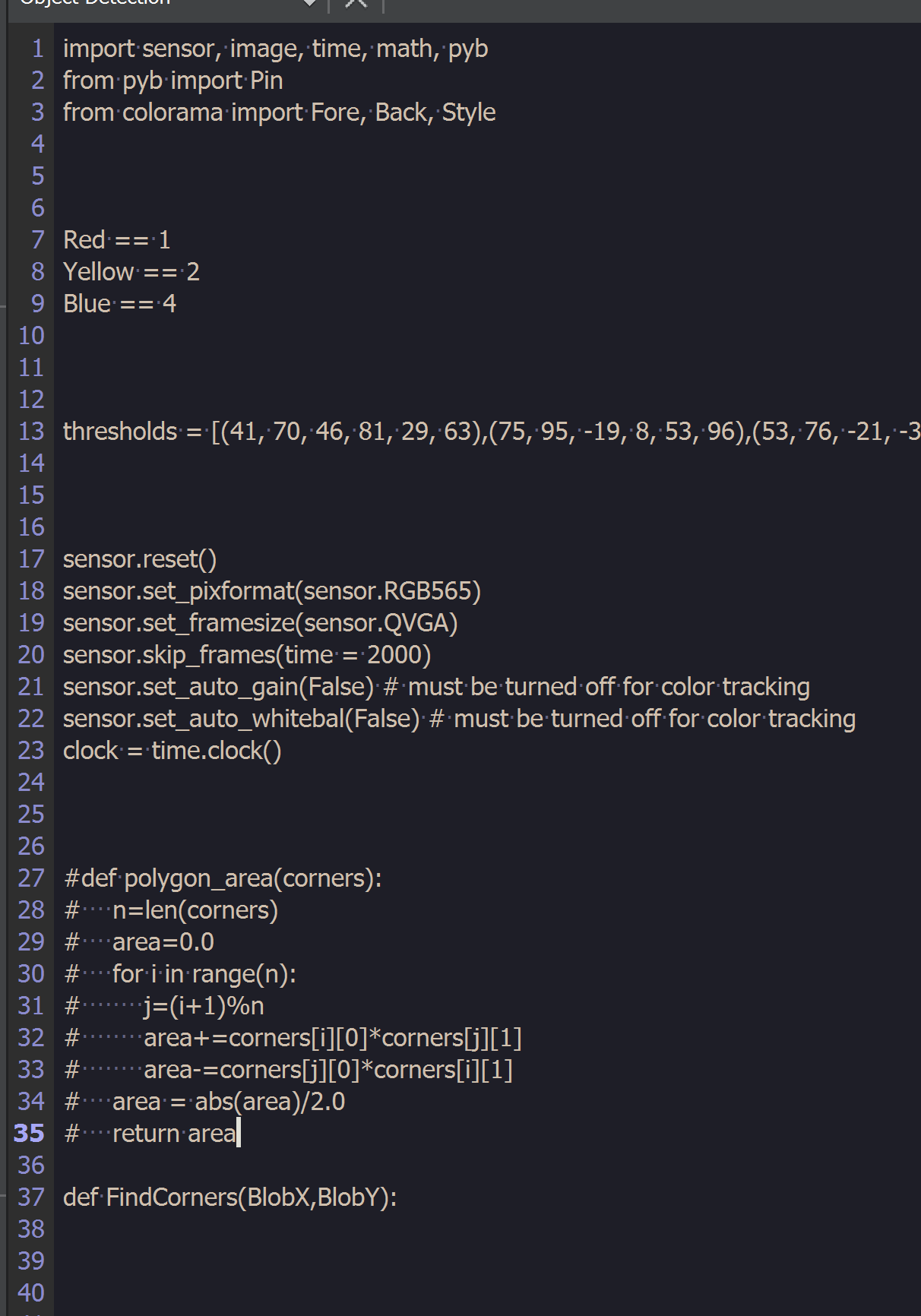
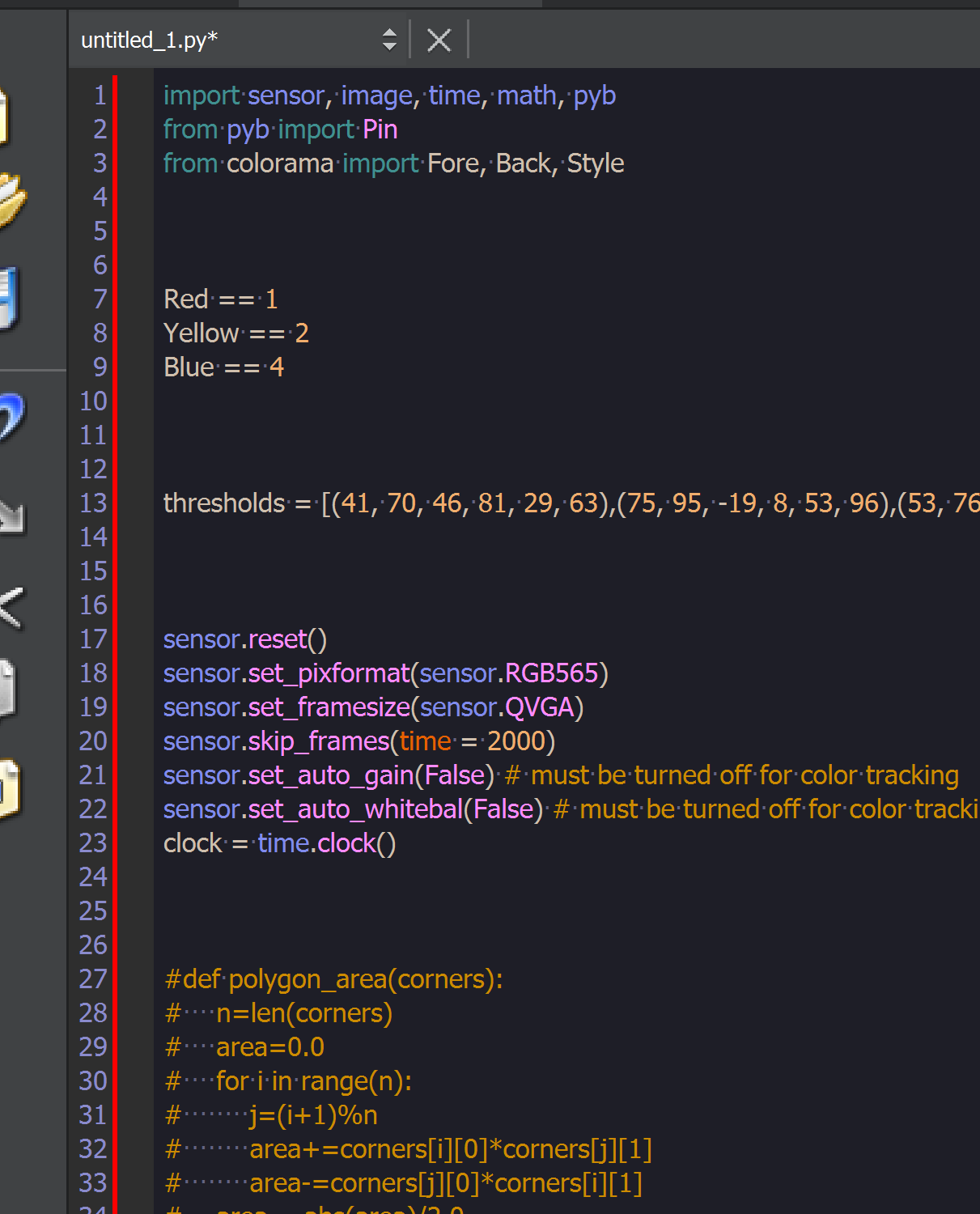
I also have a question regarding detecting shapes from within a set spot on the image. I have the corners I want to search within, but I do not know the method that does it.
---
### Author:  [@kwagyeman](https://forums.openmv.io/u/kwagyeman)
#### Post date: [September 14, 2021, 4:06pm UTC](https://forums.openmv.io/t/problem-regarding-color-recognition/6334/8 "2021-09-14T16:06:31Z")
Hi, is the file end with .py? I don’t see this issue with the IDE.
As for detecting shapes. There is no method for this. find\_blobs() can be used to do this however using the method attributes of blobs. E.g. the perimeter + elongation of a blob will be very different per shape type.
---
### Author:  [@JGreineder](https://forums.openmv.io/u/JGreineder)
#### Post date: [September 15, 2021, 6:55pm UTC](https://forums.openmv.io/t/problem-regarding-color-recognition/6334/10 "2021-09-15T18:55:04Z")
Here is the usage:
```auto
print(Shapes[checkForShapes(blob.rect()[3],blob.rect()[2],blob.roundness())])
```
And here is the shape array:
```auto
Shapes =["Not established","Cube","Barrel","Sphere"]
```
---
### Author:  [@JGreineder](https://forums.openmv.io/u/JGreineder)
#### Post date: [September 15, 2021, 8:13pm UTC](https://forums.openmv.io/t/problem-regarding-color-recognition/6334/11 "2021-09-15T20:13:38Z")
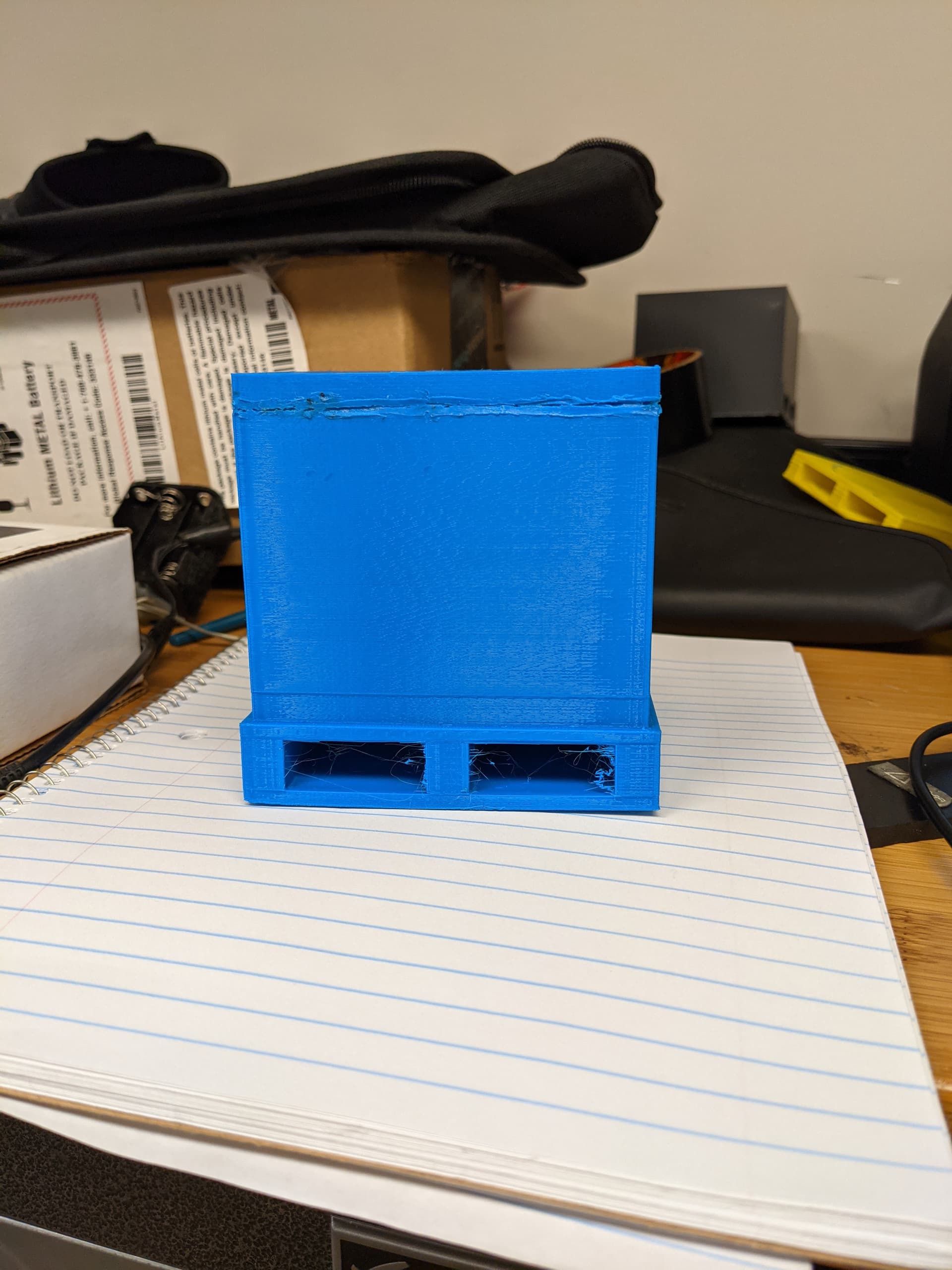
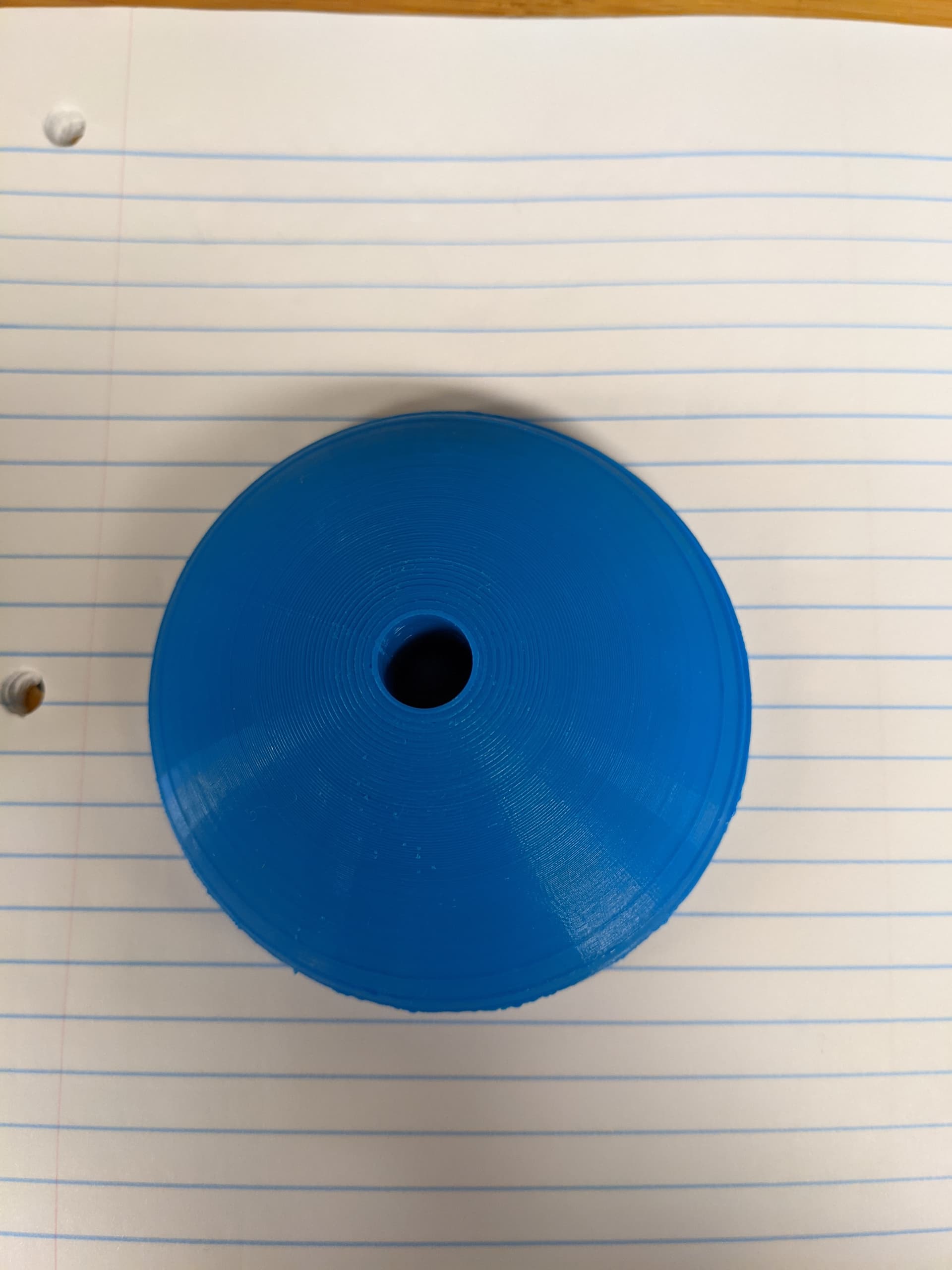
So, I changed the function a bit, and I am running into the problem of the sphere being detected as a crate, and the crate being detected as a sphere. Since the thresholds for the sphere are within the crate. How would you recommend I get around this problem?
```auto
def checkForShapes(Height, Width, CircleRoundness, Elongation):
isShape = 0
if (.53
### Author:  [@JGreineder](https://forums.openmv.io/u/JGreineder)
#### Post date: [September 15, 2021, 8:16pm UTC](https://forums.openmv.io/t/problem-regarding-color-recognition/6334/12 "2021-09-15T20:16:11Z")
Here are the objects:
---
### Author:  [@kwagyeman](https://forums.openmv.io/u/kwagyeman)
#### Post date: [September 15, 2021, 8:33pm UTC](https://forums.openmv.io/t/problem-regarding-color-recognition/6334/13 "2021-09-15T20:33:30Z")
Use the perimeter. the elongation is for stick like objects. it’s not really accurate for circles and squares. roundess is just 1 - elongation.
---
### Author:  [@JGreineder](https://forums.openmv.io/u/JGreineder)
#### Post date: [September 15, 2021, 10:40pm UTC](https://forums.openmv.io/t/problem-regarding-color-recognition/6334/14 "2021-09-15T22:40:56Z")
Okay! that makes so much more sense than I was thinking.
I am also having some problems with the hue. whenever the camera turns on, the hue is always different depending on what is in the image when it starts. how to I keep this more consistent so the thresholds can stay the same. because the color changes enough that my objects are no longer detected under those color thresholds
---
### Author:  [@kwagyeman](https://forums.openmv.io/u/kwagyeman)
#### Post date: [September 15, 2021, 11:44pm UTC](https://forums.openmv.io/t/problem-regarding-color-recognition/6334/15 "2021-09-15T23:44:43Z")
You can make the color ranges larger, or just turn off auto white balance and gain immediately.